Showing posts with label Samsung Firmware. Show all posts

Sunday, 20 July 2014

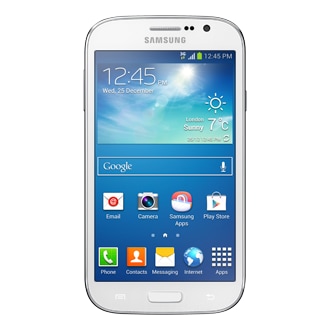
Galaxy Grand Neo I9060 with Android 4.2.2 Jelly Bean Download tool and driver

Samsung Galaxy Grand Neo (GT-I9060) users who wish to root their devices, may follow our step-by-step guide below.

This tut

orial uses Pre-Rooted Stock Firmware released by Senior Member of XDA-Developers, balliboxer.

Features
- PreRooted
- Superuser
- Blotwares removed

Disclaimer: We and the developer of this rooting procedures shall not be held responsible if any undesirable outcomes may happen to your device. use of this root guide is solely at your own risk!

Pre-requisites
1. Install USB Drivers for Samsung Grand Neo on the computer.
2. Enable USB Debugging Mode on the phone by navigating to Settings >> Developer Options.
3. Make a backup of all your important data before following the guide.
4. Ensure the battery of the phone is charged more than 80 percent.
5. The Pre-Rooted Firmware works only on the Galaxy Grand Neo (GT-I9060) also known as Galaxy Grand Lite. Applying this to any incorrect variant might brick the device. Verify the model number of the Grand Neo by navigating to Settings >> About Phone.

Files Required
1. Android 4.2.2 Jelly Bean Pre-Rooted Firmware for Galaxy Grand Neo I9060
2. Odin 3.09

Steps to Root Galaxy Grand Neo I9060 with Pre-Rooted Firmware
Step 1: Extract Pre-Rooted Firmware and Odin 3.09 files using WinRAR/7-Zip/WinZip or any other extracting tool.
Step 2: Switch off the Grand Neo. Then boot into Download Mode by pressing and holding Volume Down, Home and Power buttons together until a construction Android robot icon with a warning triangle appears on screen. Now press the Volume Up button to enter Download Mode.
Step 3: Launch Odin on the computer as an Administrator.
Step 4: Connect the Grand Neo to the computer using USB cable while it is in the Download Mode. Wait until Odin detects the device. When the device is connected successfully, the ID: COM box will turn to light blue with the COM port number. Additionally, the successful connected will be indicated by a message saying Added.
Step 5: In Odin, click the AP button and select the Pre-Rooted Firmware .tar.md5 file.
Step 6: Verify that Auto Reboot and F. Reset Time checkboxes are selected in Odin. Also, ensure the Re-Partition option is NOT selected.
Step 7: Double-check and click Start in Odin. The installation process will now begin.
Step 8: Once the installation process completes, your phone will restart and soon you will see a PASS message with green background in the left-most box at the very top of the Odin. You can now unplug the USB cable to disconnect your device from the computer.

Samsung Galaxy Grand Neo I9060 is now rooted successfully. Open the app drawer of the phone and check for an app called SuperSU. Verify the root status of the device by downloading Root Checker app from Google Play Store.

Note: If the device is stuck in boot loop after Step 8, then go to recovery mode (press and hold the Volume Up, Home and Power buttons together) and choose Wipe Data/Factory Reset and Wipe Cache Partition. Finally, return to main recovery menu and select Reboot System Now. Please note that performing wiping task will erase your device internal memory data and not external SD card data.

Thank's to all fellas at XDA who first tried out this rooting technique. This method was originally posted via XDA-Developers original thread.

Samsung Galaxy S3 Mini I8190 Official Firmware 4.1.2 Jelly Bean


Samsung Galaxy S3 Mini I8190 Official XXAMA1 Android 4.1.2 Jelly Bean Firmware Download


XXAMA1 Firmware Details:

  • PDA: I8190XXAMA1
  • CSC: I8190OXAAMA1
  • Android Version: Android 4.1.2 Jelly Bean
  • Date: 2013-01-07
  • Regions: Austria, Belgium, France, Germany, Hungary, Italy, Spain, United Kingdom

Only For

  • Samsung Galaxy S3 Mini I8190

Firmware Download

Install Tool

Samsung Driver

Put Galaxy S3 Mini into Odin Mode

  • Press and hold Volume Down + Home + Power key till the device turns on and you see the Android logo with a triangle
  • Press Volume Up key

How To Install

  • Install USB drivers to your computer
  • Extract I8190XXAMA1_I8190OXAAMA1_DBT.zip, you can get some .tar and .pit files
  • Extract Odin3 v3.04, you can get a windows application named Odin3 v3.04.exe, and run it
  • Turn off your phone, and go to Odin Mode
  • Connect your phone to computer
  • You can find the message “Added !!” under Odin’s message box
  • Now select the files that you have to flash on your phone in Odin:
         Click on PDA and select file with CODE in its name
         Click on Phone and select file with MODEM in its name. Ignore it if there is no such file
         Click on CSC and select file with CSC in its name. Ignore it if there is no such file
         Click on PIT and select the .pit file. Ignore it if there is no such file
  • In Odin, for the Re-Partition option, check it Only if you selected a .PIT file. and do not change any other
  • Click on the Start button in Odin
  • Waiting for installation
  • Your phone will reboot after the update is completed

Samsung Galaxy S3 I9305 Official Firmware 4.1.2 Jelly Bean


Android 4.1.2 Jelly Bean Firmware Download Samsung Galaxy S3 I9305 Official XXBLL5

XXBLL5 Firmware Details:

  • PDA: I9305XXBLL5
  • CSC: I9305DBTBLL4
  • Android Version: Android 4.1.2 Jelly Bean
  • Date: 2012-12-28
  • Regions: Austria, Belgium, France, Germany, Hungary, Italy, Spain, United Kingdom

Only For

  • Samsung Galaxy S3 I9305

Firmware Download

Install Tool

Samsung Drivers

Put Galaxy S3 into Odin Mode

  • Press and hold Volume Down + Home + Power key till the device turns on and you see the Android logo with a triangle
  • Press Volume Up key

How To Install

  • USB drivers installed on your computer
  • Extract I9305XXBLL5_I9305DBTBLL4_DBT.zip, you can get some .tar and .pit files
  • Extract Odin3 v3.04, you can get a windows application named Odin3 v3.04.exe, and run it
  • Turn off your phone, and go to Odin Mode
  • Connect your phone to computer
  • You can find the message “Added !!” under Odin’s message box
  • Now select the files that you have to flash on your phone in Odin:
         Click on PDA and select file with CODE in its name
         Click on Phone and select file with MODEM in its name. Ignore it if there is no such file
         Click on CSC and select file with CSC in its name. Ignore it if there is no such file
         Click on PIT and select the .pit file. Ignore it if there is no such file
  • In Odin, for the Re-Partition option, check it Only if you selected a .PIT file. and do not change any other
  • Click on the Start button in Odin
  • Waiting for installation
  • Your phone will reboot after the update is completed
  • Done 

Samsung Galaxy S3 I9300 Officia Firmware 4.1.2 Jelly Bean

Android 4.1.2 Jelly Bean Firmware Download Samsung Galaxy S3 I9300 Officia

About XXELLB Firmware:

  • PDA: I9300XXELLB
  • CSC: I9300OJVELL3
  • Android Version: Android 4.1.2 Jelly Bean
  • Date: 2013-01-08
  • Regions: Austria, Belgium, France, Germany, Hungary, Italy, Spain, United Kingdom

Only For

  • Samsung Galaxy S3 GT-I9300

Firmware Download

Install Tool

Samsung Drivers

Put Galaxy S3 into Odin Mode

  • Press and hold Volume Down + Home + Power key till the device turns on and you see the Android logo with a triangle
  • Press Volume Up key

How To Install

  • USB drivers installed on your computer
  • Extract I9300XXELLB_I9300OJVELL3_KSA.zip, you can get some .tar and .pit files
  • Extract Odin3 v3.04, you can get a windows application named Odin3 v3.04.exe, and run it
  • Turn off your phone, and go to Odin Mode
  • Connect your phone to computer
  • You can find the message “Added !!” under Odin’s message box
  • Now select the files that you have to flash on your phone in Odin:
         Click on PDA and select file with CODE in its name
         Click on Phone and select file with MODEM in its name. Ignore it if there is no such file
         Click on CSC and select file with CSC in its name. Ignore it if there is no such file
         Click on PIT and select the .pit file. Ignore it if there is no such file
  • In Odin, for the Re-Partition option, check it Only if you selected a .PIT file. and do not change any other
  • Click on the Start button in Odin
  • Waiting for installation
  • Your phone will reboot after the update is completed
  • Done


Galaxy Note 2 LTE N7105 Official Firmware V4.1.2 Jelly Bean


Samsung Galaxy Note 2 LTE N7105 Official XXDLL7 Android 4.1.2 Jelly Bean Firmware Download


About XXDLL7 Firmware:

  • PDA: N7105XXDLL7
  • CSC: N7105OLBDLL2
  • Android Version: Android 4.1.2 Jelly Bean
  • Date: 2012-12-28
  • Regions: Austria, Belgium, France, Germany, Hungary, Italy, Spain, United Kingdom

Only For

  • Samsung Galaxy Note 2 LTE N7105

Firmware Download

Install Tool

Samsung Drivers

Put Galaxy Note 2 LTE into Odin Mode

  • Press and hold Volume Down + Home + Power key till the device turns on
  • You will see a screen with yellow and red text after the Samsung logo
  • Press Volume Up

How To Install

  • USB drivers installed on your computer
  • Extract N7105XXDLL7_N7105OLBDLL2_MM1.zip, you can get some .tar and .pit files
  • Extract Odin3 v3.04, you can get a windows application named Odin3 v3.04.exe, and run it
  • Turn off your phone, and go to Odin Mode
  • Connect your phone to computer
  • You can find the message “Added !!” under Odin’s message box
  • Now select the files that you have to flash on your phone in Odin:
         Click on PDA and select file with CODE in its name
         Click on Phone and select file with MODEM in its name. Ignore it if there is no such file
         Click on CSC and select file with CSC in its name. Ignore it if there is no such file
         Click on PIT and select the .pit file. Ignore it if there is no such file
  • In Odin, for the Re-Partition option, check it Only if you selected a .PIT file. and do not change any other
  • Click on the Start button in Odin
  • Waiting for installation
  • Your phone will reboot after the update is completed

Saturday, 19 July 2014

Galaxy Tab 2 10.1 P5100 Official Firmware V 4.1.1 Jelly Bean


Samsung Galaxy Tab 2 10.1 P5100 Official XXCLL2 Android 4.1.1 Jelly Bean Firmware Download


XXCLL2 Firmware Details:

  • PDA: P5100XXCLL2
  • CSC: P5100OLBCLL2
  • Android Version: Android 4.1.1 Jelly Bean
  • Date: 2012-12-14
  • Regions: Austria, Belgium, France, Germany, Hungary, Italy, Spain, United Kingdom

Only For

  • Samsung Galaxy Tab 2 10.1 P5100 

Firmware Download

Install Tool

Samsung Drivers

Put Galaxy Tab 2 10.1 into Odin Mode

  • Press and hold Volume Down + Home + Power key till the device turns on
  • You will see a screen with yellow and red text after the Samsung logo
  • Press Volume Up key

How To Install

  • USB drivers installed on your computer
  • Extract P5100XXCLL2_P5100OLBCLL2_XSP.zip, you can get some .tar and .pit files
  • Extract Odin3 v3.04, you can get a windows application named Odin3 v3.04.exe, and run it
  • Turn off your tablet, and go to Odin Mode
  • Connect your tablet to computer
  • You can find the message “Added !!” under Odin’s message box
  • Now select the files that you have to flash on your tablet in Odin:
         Click on PDA and select file with CODE in its name
         Click on Phone and select file with MODEM in its name. Ignore it if there is no such file
         Click on CSC and select file with CSC in its name. Ignore it if there is no such file
         Click on PIT and select the .pit file. Ignore it if there is no such file
  • In Odin, for the Re-Partition option, check it Only if you selected a .PIT file. and do not change any other
  • Click on the Start button in Odin
  • Waiting for installation
  • Your tablet will reboot after the update is completed

Galaxy Note 10.1 LTE SHV-E230S Stock KSALJF Firmware V4.1.1


Samsung Galaxy Note 10.1 LTE SHV-E230S Stock KSALJF Android 4.1.1 Jelly Bean Firmware Download


KSALJF Firmware Details:

  • PDA: E230SKSALJF
  • CSC: E230SSKTALI1
  • Android Version: Android 4.1.1 Jelly Bean
  • Date: 2012-11-01
  • Regions: South Korea

Only For

  • Samsung Galaxy Note 10.1 LTE SHV-E230S

Firmware Download

Install Tool

Samsung Drivers

Put Galaxy Note 10.1 LTE into Odin Mode

  • Press and hold Volume Down + Power key till you see the Samsung logo
  • Waiting for you see exclamation mark with triangle
  • Press Volume Up key

How To Install

  • USB drivers installed on your computer
  • Extract E230SKSALJF_E230SSKTALI1_SKT.zip, you can get some .tar and .pit files
  • Extract Odin3 v3.04, you can get a windows application named Odin3 v3.04.exe, and run it
  • Turn off your tablet, and go to Odin Mode
  • Connect your tablet to computer
  • You can find the message “Added !!” under Odin’s message box
  • Now select the files that you have to flash on your tablet in Odin:
         Click on PDA and select file with CODE in its name
         Click on Phone and select file with MODEM in its name. Ignore it if there is no such file
         Click on CSC and select file with CSC in its name. Ignore it if there is no such file
         Click on PIT and select the .pit file. Ignore it if there is no such file
  • In Odin, for the Re-Partition option, check it Only if you selected a .PIT file. and do not change any other
  • Click on the Start button in Odin
  • Waiting for installation
  • Your tablet will reboot after the update is completed
  • Done

Samsung Galaxy Chat B5330 Official Firmware Android 4.0.4


Samsung Galaxy Chat B5330 Official XWALL2 Android 4.0.4 Firmware Download             

About XWALL2 Firmware:

  • PDA: B5330XWALL2
  • CSC: B5330OXXALL3
  • Android Version: Android 4.0.4 Ice Cream Sandwich
  • Date: 2012-12-17
  • Regions: Austria, Belgium, France, Germany, Hungary, Italy, Spain, United Kingdom

Only For

  • Samsung Galaxy S Duos S7562

Firmware Download

Install Tool

Samsung Drivers

Put Galaxy Chat into Odin Mode

  • Press and hold Volume Down + Home + Power key till you feel the phone vibrate
  • Waiting for you see exclamation mark with triangle
  • Press Volume Up key

How To Install

  • USB drivers installed on your computer
  • Extract B5330XWALL2_B5330OXXALL3_EUR.zip, you can get some .tar and .pit files
  • Extract Odin3 v3.04, you can get a windows application named Odin3 v3.04.exe, and run it
  • Turn off your phone, and go to Odin Mode
  • Connect your phone to computer
  • You can find the message “Added !!” under Odin’s message box
  • Now select the files that you have to flash on your phone in Odin:
         Click on PDA and select file with CODE in its name
         Click on Phone and select file with MODEM in its name. Ignore it if there is no such file
         Click on CSC and select file with CSC in its name. Ignore it if there is no such file
         Click on PIT and select the .pit file. Ignore it if there is no such file
  • In Odin, for the Re-Partition option, check it Only if you selected a .PIT file. and do not change any other
  • Click on the Start button in Odin
  • Waiting for installation
  • Your phone will reboot after the update is completed

Samsung Galaxy W I8150 Firmware V Android 2.3.6


Samsung Galaxy W I8150 Official XXLMI Android 2.3.6 Firmware Download         

XXLMI Firmware Details:

  • PDA: I8150XXLMI
  • CSC: I8150OXXLC2
  • Android Version: Android 2.3.6
  • Date: 2012-12-11
  • Regions: Austria, Belgium, France, Germany, Hungary, Italy, Spain, United Kingdom

Only For

  • Samsung Galaxy W I8150

Firmware Download

Install Tool

Samsung Drivers

Put Galaxy W into Odin Mode

  • Press and hold Volume Down + Home + Power key till you see the Samsung logo
  • Waiting for you see exclamation mark with triangle
  • Press Volume Up key

How To Install

  • USB drivers installed on your computer
  • Extract I8150XXLMI_I8150OXXLC2_XEU.zip, you can get some .tar and .pit files
  • Extract Odin3 v1.85, you can get a windows application named Odin3 v1.85.exe, and run it
  • Turn off your phone, and go to Odin Mode
  • Connect your phone to computer
  • You can find the message “Added !!” under Odin’s message box
  • Now select the files that you have to flash on your phone in Odin:
         Click on PDA and select file with CODE in its name
         Click on Phone and select file with MODEM in its name. Ignore it if there is no such file
         Click on CSC and select file with CSC in its name. Ignore it if there is no such file
         Click on PIT and select the .pit file. Ignore it if there is no such file
  • In Odin, for the Re-Partition option, check it Only if you selected a .PIT file. and do not change any other
  • Click on the Start button in Odin
  • Waiting for installation
  • Your phone will reboot after the update is completed
  • Done 

Samsung Galaxy Ace 2 I8160 Stock Firmware V 2.3.6


Samsung Galaxy Ace 2 I8160 Stock XXLL2 Android 2.3.6 Firmware Download      

XXLL2 Firmware Details:

  • PDA: I8160XXLL2
  • CSC: I8160QXXLL3
  • Android Version: Andriod 2.3.6 Gingerbread
  • Date: 2012-12-28
  • Regions: Austria, Belgium, France, Germany, Hungary, Italy, Spain, United Kingdom

Only For

  • Samsung Galaxy Ace 2 I8160

Firmware Download

Install Tool

Samsung Drivers

Put Galaxy Ace 2 into Odin Mode

  • Press and hold Volume Down + Home + Power key till you see the Samsung logo
  • Waiting for you see exclamation mark with triangle
  • Press Volume Up key

How To Install

  • USB drivers installed on your computer
  • Extract I8160XXLL2_I8160QXXLL3_LUX.zip, you can get some .tar and .pit files
  • Extract Odin3 v1.85, you can get a windows application named Odin3 v1.85.exe, and run it
  • Turn off your phone, and go to Odin Mode
  • Connect your phone to computer
  • You can find the message “Added !!” under Odin’s message box
  • Now select the files that you have to flash on your phone in Odin:
         Click on PDA and select file with CODE in its name
         Click on Phone and select file with MODEM in its name. Ignore it if there is no such file
         Click on CSC and select file with CSC in its name. Ignore it if there is no such file
         Click on PIT and select the .pit file. Ignore it if there is no such file
  • In Odin, for the Re-Partition option, check it Only if you selected a .PIT file. and do not change any other
  • Click on the Start button in Odin
  • Waiting for installation
  • Your phone will reboot after the update is completed
  • Done 

Samsung Galaxy S3 Mini Android 4.1.2 Jelly BeanFirmware Download

4.1.2 Jelly Bean Firmware Download Samsung Galaxy S3 Mini I8190N Official XXALL6 Android 4.1.2 Jelly Bean    
 About XXALL6 Firmware:

  • PDA: I8190NXXALL6
  • CSC: I8190NOXAALL6
  • Android Version: Android 4.1.2 Jelly Bean
  • Date: 2012-12-26
  • Regions:

Only For

  • Samsung Galaxy S3 Mini I8190N

Firmware Download

Install Tool

Samsung Driver

Put Galaxy S3 Mini into Odin Mode

  • Press and hold Volume Down + Home + Power key till the device turns on and you see the Android logo with a triangle
  • Press Volume Up key

How To Install

  • USB drivers installed on your computer
  • Extract I8190NXXALL6_I8190NOXAALL6_DBT.zip, you can get some .tar and .pit files
  • Extract Odin3 v3.04, you can get a windows application named Odin3 v3.04.exe, and run it
  • Turn off your phone, and go to Odin Mode
  • Connect your phone to computer
  • You can find the message “Added !!” under Odin’s message box
  • Now select the files that you have to flash on your phone in Odin:
         Click on PDA and select file with CODE in its name
         Click on Phone and select file with MODEM in its name. Ignore it if there is no such file
         Click on CSC and select file with CSC in its name. Ignore it if there is no such file
         Click on PIT and select the .pit file. Ignore it if there is no such file
  • In Odin, for the Re-Partition option, check it Only if you selected a .PIT file. and do not change any other
  • Click on the Start button in Odin
  • Waiting for installation
  • Your phone will reboot after the update is completed
  • Done